How to Add a Free Gift to the Cart on Shopify?
Shopify's native Buy X Get Y discount can make a gift free, but it can't automatically add it to the cart. This guide explains the limitations of native discounts and how you can make automatically add free gifts to your customer's cart with Dollarlabs: Ultimate Discounts.
Ganga6 minute read
A free gift with purchase adds a product to the cart at no charge when the customer meets a condition you set, like spending $50 or buying a specific product from your summer collection. The gift appears on its own. No code to enter, no banner to read through to find one.
It easily becomes one of the most configured promotional campaigns on Shopify: Increase AOV and a great way to build customer loyalty with freebies.
It's also one of the most misconfigured, because of Shopify’s native discount feature limitations.
What are the limits of Shopify’s native free gift discount?
Shopify discounts change the price of items in a cart. Gifts don’t get automatically added to your customer’s cart. When you set up the free gift natively with the Buy X Get Y feature, the gift will be priced at $0, but the customer still has to find and manually add the gift to the cart. Most won't, unless a banner or a product page banner tells them to.
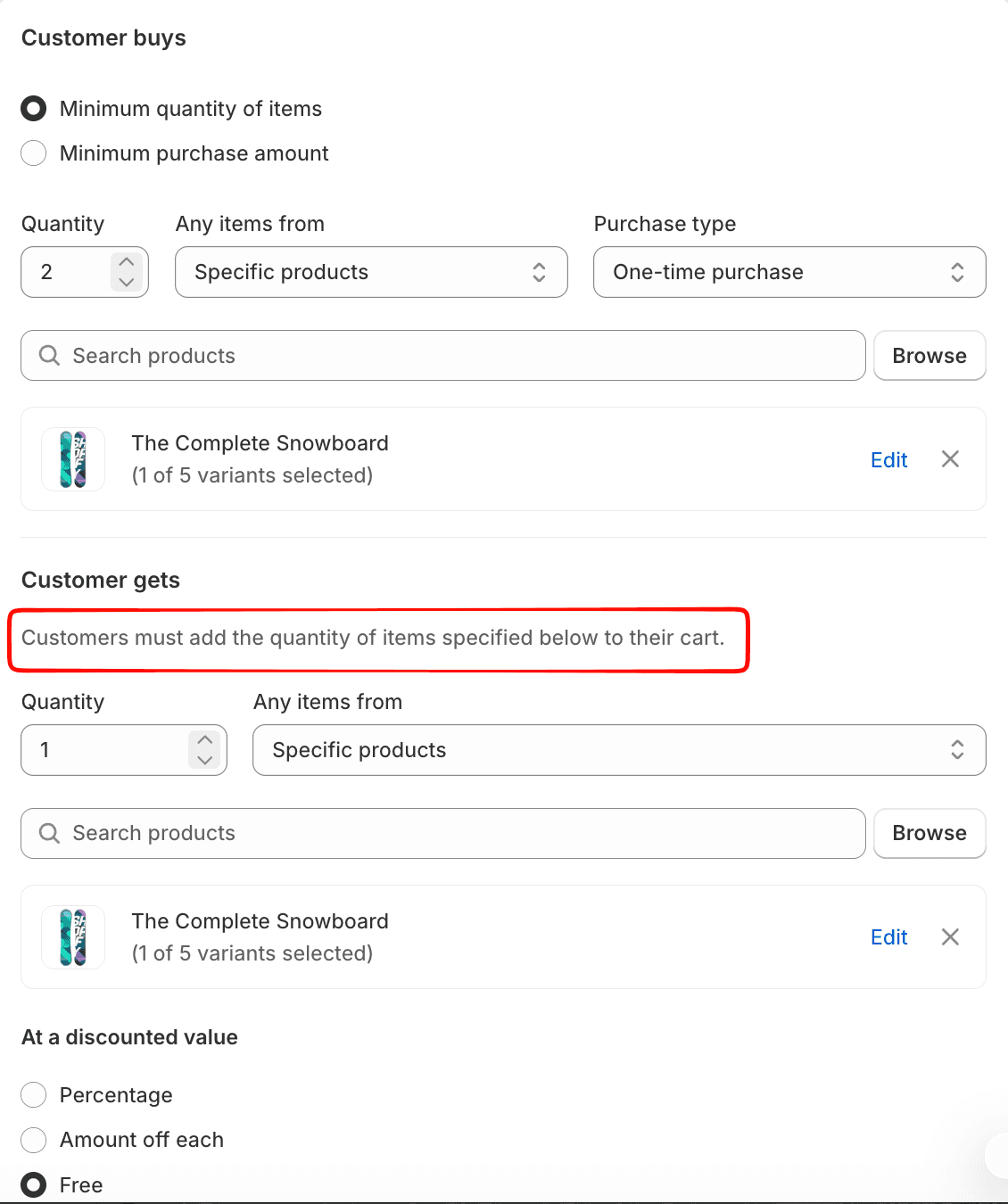
This is not a setting you have missed. Shopify’s discounts are a pricing operation, and not a cart operation. The discount engine evaluates the contents of a cart, and calculates reductions against them. But, creating a new line item (i.e., auto adding a free gift) is a different kind of operation.
| Limit | Consequence |
| No auto-removal | The customer drops below the threshold and the gift stays in the cart at $0. You give away stock on orders that no longer qualify. |
| No gift choice | One gift per offer. You cannot offer a choice of three, which is what makes gifting work for varied catalogues. |
| No product page display | Nothing announces the offer where the customer decides what to buy, so it cannot influence basket size. |
| No tiered gifts | "Spend $75 get A, spend $150 get A and B" is not expressible in a single native discount. |
No combination of conditions, minimums or combination settings will make a native discount add a product. The easiest way to solve this is using a function-based app, or on Shopify Plus, a checkout extension.
How does Shopify Free Gift Discount Apps solve for Free Gift discount?
An app handles the part Shopify doesn’t: Automatically adding free gifts to the customer’s cart, and removing it when the conditions are not met. It checks the cart against your conditions, and when they're met the gift is added, either as a zero-priced line or at 100% off.
Example: A coffee roaster offers a free house blend over $60. A customer builds a $72 cart and the gift is added. They swap a 1kg bag for a 250g one, dropping to $54, and the gift is removed before checkout.
How do you Set up a Free Gift in Dollarlabs: Ultimate Discounts?
With Ultimate Discounts, you can configure free gifts as product discounts with the advanced rule builder.
Product scope: Where the offer appears. You can run it across all products, or narrow it to specific collections, products, or individual variants.
Max Quantity: How many units of the gift a single customer can receive.
Combinations. Whether the gift can run alongside a discount code, an order discount, or free shipping.
Two offer types cover most campaigns: BOGO for gifts tied to a product, and Tiered Gift for gifts tied to spend.
BOGO: Gifts Tied to a Product
This is for offers where the trigger is something in the cart rather than a cart total.
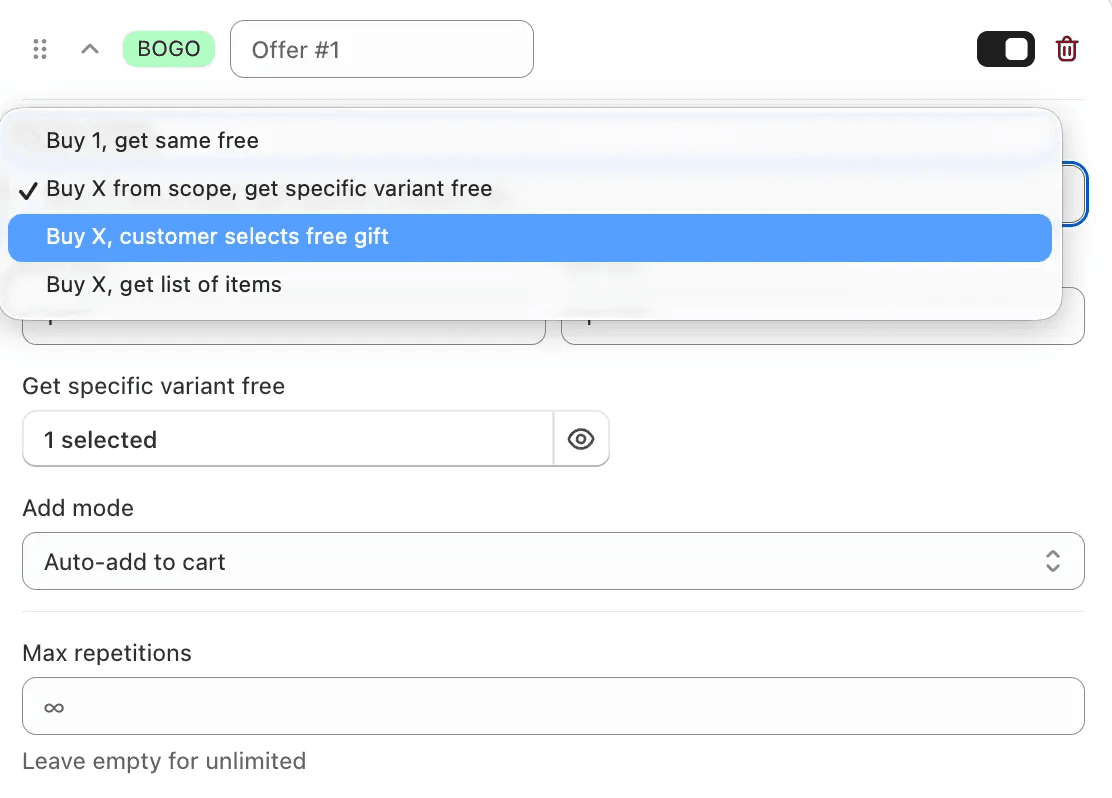
Buy 1, get the same free. The straightforward doubling offer. Buy a bag of coffee, get another of the same.
Buy X from scope, get specific variant free. The customer buys anything from a collection you define, and you choose exactly which variant/product they receive. This is useful when the gift is a fixed product, like a sample size moisturiser that goes out with every skincare order.
Buy X, customer selects free gift. They qualify, then pick from options you've set. This is the mode that fixes the biggest weakness of native gifting: one fixed gift means betting the promotion on a single product appealing to everyone who qualifies.
Buy X, get list of items. They receive several products, not one. Bundle-style gifting.
Tiered Gift: gifts tied to spend
This one's for gifts that scale with cart value. You set a subtotal threshold, pick the gift for that tier, set a quantity, and add as many tiers as you need.
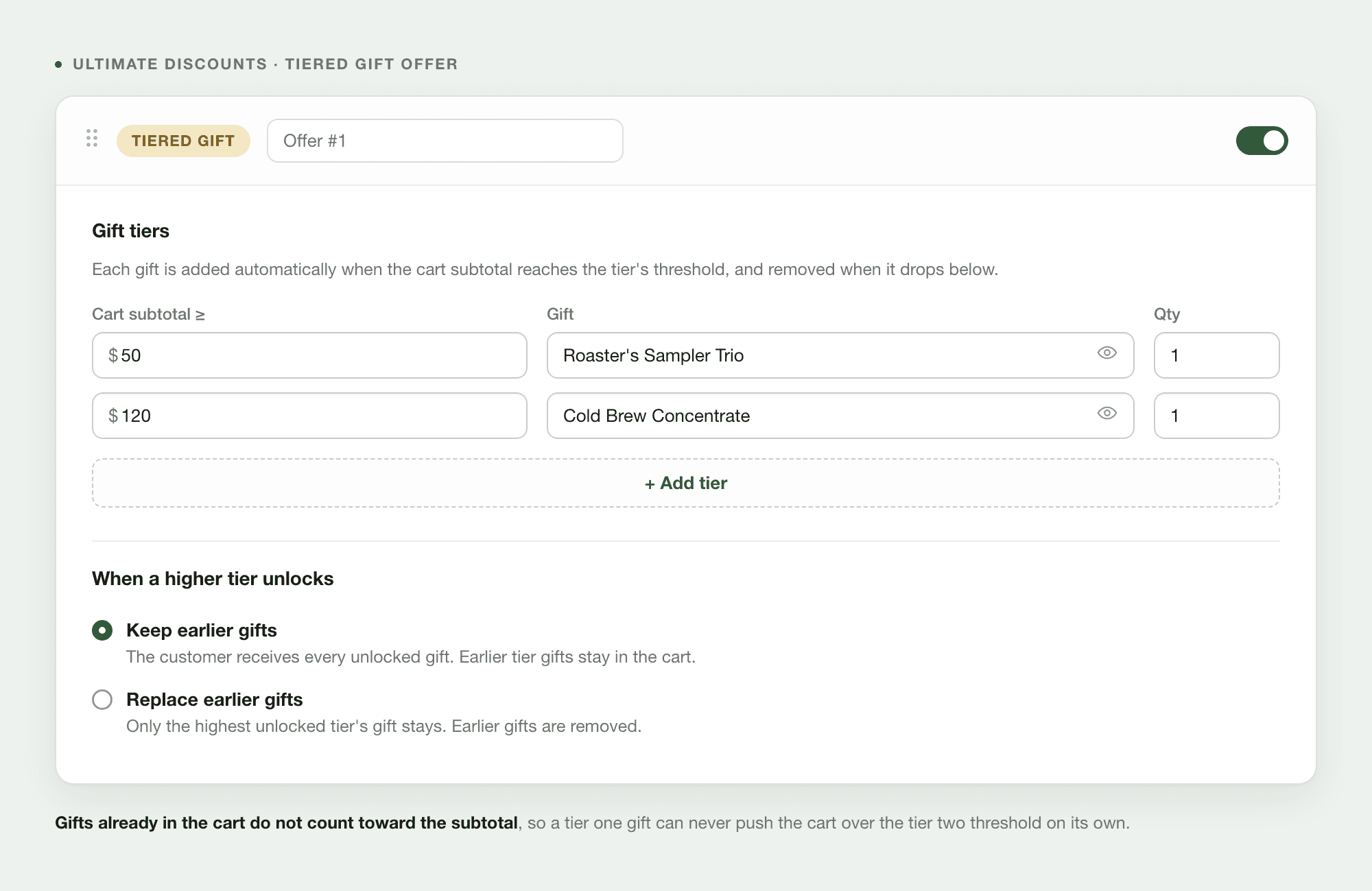
Each gift is added when the cart reaches its threshold and removed when it drops below. Gifts already in the cart don't count toward the subtotal, so one tier can't unlock the next.
Do you need Shopify Plus to add a free gift at checkout?
Yes for checkout, no for the promotion itself. Checkout customisation is limited to Shopify Plus, so a gift triggered by a code entered at checkout needs a Plus plan. Below Plus, the gift is added at the cart page instead.
On Plus, the setup runs in three parts:
The extension decides when to show or add the gift based on a trigger you set. Three kinds:
**A discount code:**The customer enters something like FREEBOTTLE and the gift is added. Useful when you want the offer tied to a campaign rather than open to everyone, so email promotions, influencer codes, VIP rewards.
Cart conditions. The extension watches the cart and the offer appears on its own when the condition is met, say sneakers being added. No code involved, nothing for the customer to know about in advance.
If you are not on Shopify Plus, the gift is added on the product page and in the cart instead of at checkout.
Why is my free gift not appearing in the cart?
The most common cause is inventory. If the gift product hits zero stock the promotion fails silently, and nothing in your Shopify admin will flag it.
Gift product inventory: If the gift is out of stock, the discount cannot apply and the offer stops working for customers. Shopify does not flag this, so it needs to be checked manually.
Cart eligibility. Confirm the cart still meets your threshold. Another discount applied earlier in the cart can reduce the subtotal below your minimum, which disqualifies the order.
Competing discounts. When two discounts apply to the same items and are not configured to combine, Shopify applies whichever one gives the customer the larger reduction. If your gift discount is the smaller of the two, it is dropped.
If the gift appears but is not free, check your discount combinations for another automatic discount overriding it, and confirm the gift product has not been excluded from the discount's eligible products.
If a discount code removed your Buy X Get Y, that is expected behaviour. A code covering products in an active Buy X Get Y offer causes the Buy X Get Y to drop out, leaving only the code. Scope them to different collections, or use an order discount instead.
Frequently Asked Questions
Can a discount code add a free product to the cart in Shopify? Not natively. Discounts adjust prices on items already in the cart. Adding the product requires an app, or a checkout extension on Plus.
Do I need Shopify Plus for a free gift promotion? No. Plus is needed only to add gifts at checkout. Below Plus the gift goes in at the cart page.
What threshold should I set for a free gift? Start 15 to 25 percent above your current average order value. If your AOV is $65, try $75 to $80.
Why did my free gift work yesterday and not today? Check inventory on the gift product. It is the most common cause and it fails without warning.
Can customers choose from several free gifts on Shopify? Not with native discounts, which support one gift per offer. Gift choice requires an app.